
mall4j第三方接口对接协议.md 30 KB
接口描述
接口的通讯报文采用 Http请求正文格式,系统提供通过服务器调用的形式调用接口的能力
商家端、平台端:第三方服务器调用的接口和商家/平台直接登录进行调用的接口是一样的。我们通过签名验签的方式代替了商家/平台直接登录的形式。
用户端:第三方服务器通过调用系统提供的四个签名验签的接口向系统注册用户、将第三方token同步到系统中,后面就可以通过传递token形式调用用户端其他接口(具体查看下面用户端对接介绍)
功能支持
- MultishopApplication:支持
- PlatformApplication:支持
- ApiApplication:支持
密钥分不同的系统类型访问类型,分为商家,平台,用户。其中商家和平台细分了菜单权限, 且商家密钥有全部商家和指定商家访问的细分。
商家端、平台端对接
商家端、平台端接口均采用签名的方式调用
接口报文结构及报文与签名生成
为了区分服务器调用还是普通的用户调用,需要携带请求头“grantType = sign”,grantType这个参数是Oauth2.0协议当中用来确定授权方式的,系统也利用同样的词汇来区分是否为签名验证的用户。同时根据http请求的content-type 不同,如果是application/json这种形式的,json的数据将会被data包裹(通常是post、put、delete请求)。如果只是普通的get请求或图片上传等请求,那么请求的数据不需要被包裹
接口报文规范
POST、PUT、DELETE 请求格式说明
请求头(Header)
| 字段元素 | 类型 | 是否必填 | 说明 |
|---|---|---|---|
| grantType | String | 是 | 固定为:sign |
| Content-Type | String | 是 | 固定为:application/json |
| data-type | String | 否 | 在非get请求参数为纯数组时传参:list |
请求参数
| 字段元素 | 类型 | 是否必填 | 说明 |
|---|---|---|---|
| appId | String | 是 | 分配给应用的系统密钥id |
| timestamp | Long | 是 | 请求的时间戳,接入系统的时间误差不能超过 10 分钟,毫秒 |
| sign | String | 是 | 签名,通过签名机制,防止应用的请求参数被非法篡改,业务系统必须保证该值不被泄露。 |
| data | Object | 是 | 真正请求的数据(当且仅当content-type是application/json的时候,将真正的数据放入data) |
为了方便起见,以下所有涉及到签名的,我们使用一个演示签名用的appId和appSecret
appId: appId123456
appSecret: appSecret123456
data参数构成
| 字段元素 | 类型 | 必填条件 | 说明 |
|---|---|---|---|
| userId | String | 调用平台端接口时必填 | 平台管理员的账号id,用于定位到具体的管理员账号 |
| shopId | String | 调用商家端接口时必填 | 商家店铺id,用于定位到具体的店铺 |
下面以平台端新增热搜接口来做一个实例讲解:

接口地址为:/platform/hotSearch
接口请求参数为:
 {
        "hotSearchId": 0,
        "shopId": 0,
        "title": "",
        "content": "",
        "recDate": "",
        "seq": 0,
        "status": 0
 }
实际的请求格式为:
curl --location --request POST 'http://localhost:8088sss/platform/hotSearch' \
--header 'grantType: sign' \
--header 'Content-Type: application/json' \
--data-raw '{
    "appId":"appId123456",
    "timestamp":1640761421949,
    "data":{
       "userId": 1,
       "hotSearchId": 1,
       "shopId": 0,
       "title": "热搜标题",
       "content": "热搜内容",
       "recDate": "",
       "seq": 0,
       "status": 1
     },
    "sign":"bdb4bf1c63dada19901d7022e187d1558b1ce001c3ae53bb9b6ac37355a9bcbe"
}'
appId:分配给应用的系统密钥id
timestamp: 请求的时间戳,根据当前时间生成
sign: 签名,使用该请求参数生成,生成流程在下面有说明
data.userId : 此次请求使用平台端id为1的管理员账号进行操作
其他data参数为接口的参数
以上就是一个post请求的全部数据了
sign(签名)的生成流程:
1.拼接json数据,生成post请求签名用到的参数有 appSecret、timestamp和data,具体实例为:
{
       "appSecret": "appSecret123456",
       "timestamp": "1640761421949",
       "data": {
           "userId": 1,
           "hotSearchId": 1,
           "shopId": 0,
           "title": "热搜标题",
           "content": "热搜内容",
           "recDate": "",
           "seq": 0,
           "status": 1
       }
}
2.对json参数重新进行排序,根据key的值按顺序进行排序,排序后的数据格式为:
{
       "appSecret": "appSecret123456",
       "data": {
           "userId": 1,
           "hotSearchId": 1,
           "shopId": 0,
           "title": "热搜标题",
           "content": "热搜内容",
           "recDate": "",
           "seq": 0,
           "status": 1
       },
       "timestamp": "1640761421949"
}
- 通过sha256的形式进行签名, 签名结果为:bdb4bf1c63dada19901d7022e187d1558b1ce001c3ae53bb9b6ac37355a9bcbe

在线加密地址:https://crypot.51strive.com/sha256.html
java代码示例
/**
* 新增热搜接口
*/
public static void main(String[] args) {
        // +++++++++++++++++++++++++++++++++ 组装post请求数据 +++++++++++++++++++++++++++++++++
        Long timestamp = System.currentTimeMillis();

        // 实际的接口数据
        TreeMap<String,Object> dataMap = new TreeMap<>();
        dataMap.put("content","热搜内容");
        dataMap.put("seq", 0);
        dataMap.put("status", 1);
        dataMap.put("title","热搜标题");
        dataMap.put("recDate","");
        // 平台账号id
        dataMap.put("userId", "1");

        TreeMap<String,Object> param = new TreeMap<>();
        param.put("timestamp",timestamp.toString());
        param.put("appSecret", "appSecret123456");
        param.put("data", dataMap);
        // 签名
        Digester sha256 = new Digester(DigestAlgorithm.SHA256);
        String sign = sha256.digestHex(Json.toJsonString(param));
        // 添加签名和账号id
        param.put("sign", sign);
        param.put("appId","appId123456");


        // +++++++++++++++++++++++++++++++++ 发送post请求 +++++++++++++++++++++++++++++++++
        String result = HttpRequest.post("http://localhost:8088/platform/hotSearch")
                .header("grantType","sign")
                .header("Content-Type","application/json")
                .body(JSONObject.toJSONString(param))
                .execute().body();
        System.out.println(result);


        // +++++++++++++++++++++++++++++++++ 响应数据验签 +++++++++++++++++++++++++++++++++

        // 结果验签
        TreeMap<String, Object> responseMap = JSONObject.parseObject(result, TreeMap.class);

        TreeMap<String, Object> map = new TreeMap<>();
        map.put("appSecret", "appSecret123456");
        map.put("data", responseMap.get("data"));
        map.put("timestamp", responseMap.get("timestamp"));

        // 验签
        if (Objects.equals(responseMap.get("sign").toString(), sha256.digestHex(Json.toJsonString(map)))) {
            System.out.println("success");
        }
    }
GET请求格式说明
请求头(Header)
| 字段元素 | 类型 | 是否必填 | 说明 |
|---|---|---|---|
| grantType | String | 是 | 固定为:sign |
请求参数
| 字段元素 | 类型 | 是否必填 | 说明 |
|---|---|---|---|
| appId | String | 是 | 分配给应用的系统密钥id |
| timestamp | Long | 是 | 请求的时间戳,接入系统的时间误差不能超过 10 分钟,毫秒 |
| sign | String | 是 | 签名,通过签名机制,防止应用的请求参数被非法篡改,业务系统必须保证该值不被泄露。 |
| userId | String | 否 | 调用平台端接口时必填,平台管理员的账号id,用于定位到具体的管理员账号 |
| shopId | String | 否 | 调用商家端接口时必填,商家店铺id,用于定位到具体的店铺 |
| 其他请求参数 | 接口的实际请求参数 |
下面以平台端商品搜索接口来做一个实例讲解:

接口地址为:/platform/hotSearch
接口请求参数为:
current = 1
size = 10
实际的请求格式为:
curl --location --request GET 'http://localhost:8088/platform/search/prod/page?current= 1&size=10&userId=1×tamp=1640761421949&appId=appId123456&sign=26c31bf515ac28ef13e2dc88ae6c7f5de7f8cace45c5852a0948648802e5bd02' \
--header 'grantType: sign'
appId:分配给应用的系统密钥id
timestamp: 请求的时间戳,根据当前时间生成
userId: 此次请求使用平台端id为1的管理员账号进行操作
sign: 签名,使用该请求参数生成,生成流程在下面有说明
current : 请求接口的参数,查询分页为1的数据
size: 请求接口的参数,每页数据大小为10
以上就是一个get请求的全部数据了
sign(签名)的生成流程:
1.拼接json数据,生成get请求签名用到的参数有 appSecret、timestamp和接口中的参数,具体实例为:
注意:get请求的sign获取数据跟post请求相同都是json,不同的是value的值必须是字符串
{
       "appSecret": "appSecret123456",
       "timestamp": "1640761421949",
       "userId": "1",
       "current ": "1",
       "size": "10"
}
2.对json参数重新进行排序,根据key的值按顺序进行排序,排序后的数据格式为:
{
       "appSecret": "appSecret123456",
       "current ": "1",
       "size": "10",
       "timestamp": "1640761421949",
       "userId": "1"
}
- 通过sha256的形式进行签名, 签名结果为:26c31bf515ac28ef13e2dc88ae6c7f5de7f8cace45c5852a0948648802e5bd02

在线加密地址:https://crypot.51strive.com/sha256.html
java代码示例
/**
* 查询商品接口
*/
public static void main(String[] args) {

        // +++++++++++++++++++++++++++++++++ 组装get请求数据 +++++++++++++++++++++++++++++++++

        Long timestamp = System.currentTimeMillis();

        TreeMap<String,Object> param = new TreeMap<>();
        // 平台账号id
        param.put("userId", "1");
        param.put("timestamp",timestamp.toString());
        param.put("appSecret", "appSecret123456");
        // 接口请求参数
        param.put("current", "1");
        param.put("size", "10");
        // 签名
        Digester sha256 = new Digester(DigestAlgorithm.SHA256);
        String sign = sha256.digestHex(Json.toJsonString(param));
        // 添加签名和账号id
        param.put("sign", sign);
        param.put("appId","appId123456");

        // +++++++++++++++++++++++++++++++++ 发送get请求 +++++++++++++++++++++++++++++++++

        String result = HttpRequest.get("http://localhost:8088/platform/search/prod/page")
                .header("grantType","sign")
                .form(param)
                .execute().body();
        System.out.println(result);


        // +++++++++++++++++++++++++++++++++ 响应数据验签 +++++++++++++++++++++++++++++++++

        // 结果验签
        TreeMap<String, Object> responseMap = JSONObject.parseObject(result, TreeMap.class);

        TreeMap<String, Object> map = new TreeMap<>();
        map.put("appSecret", "appSecret123456");
        map.put("data", responseMap.get("data"));
        map.put("timestamp", responseMap.get("timestamp"));

        // 验签
        if (Objects.equals(responseMap.get("sign").toString(), sha256.digestHex(Json.toJsonString(map)))) {
            System.out.println("success");
        }
    }
用户端对接
用户端提供四个用签名验签方式调用的接口
- 注册用户接口
- 将用户token以及过期时间同步到商城接口
- 修改用户名称接口
- 禁用用户接口
通过注册用户(调用注册用户接口)、将token同步到系统中(调用将用户token以及过期时间同步到商城接口),既可正常请求用户端其他接口(请求头传递token形式)
用签名验签方式调用的接口报文结构及报文与签名生成
为了区分服务器调用还是普通的用户调用,需要携带请求头“grantType = sign”,grantType这个参数是Oauth2.0协议当中用来确定授权方式的,系统也利用同样的词汇来区分是否为签名验证的用户。同时根据http请求的content-type 不同,如果是application/json这种形式的,json的数据将会被data包裹(通常是post、put、delete请求)。如果只是普通的get请求或图片上传等请求,那么请求的数据不需要被包裹
接口报文规范
POST、PUT 请求格式说明
请求头(Header)
| 字段元素 | 类型 | 是否必填 | 说明 |
|---|---|---|---|
| grantType | String | 是 | 固定为:sign |
| Content-Type | String | 是 | 固定为:application/json |
请求参数
| 字段元素 | 类型 | 是否必填 | 说明 |
|---|---|---|---|
| appId | String | 是 | 分配给应用的系统密钥id |
| timestamp | Long | 是 | 请求的时间戳,接入系统的时间误差不能超过 10 分钟,毫秒 |
| sign | String | 是 | 签名,通过签名机制,防止应用的请求参数被非法篡改,业务系统必须保证该值不被泄露。 |
| data | Object | 是 | 真正请求的数据(当且仅当content-type是application/json的时候,将真正的数据放入data) |
下面四个涉及签名的接口,这里我是用一个演示的用户端签名
appId: 167633802736
appSecret:3bf5e9951ee3406e109389a3118a6f7be15d0339b57dbe2a9db0b0a9149cdf131702370796764
注册用户接口
data参数构成
| 字段元素 | 类型 | 必填条件 | 说明 |
|---|---|---|---|
| userId | String | 必填 | 通信的用户唯一ID,可以随机uuid (建议自己服务端的用户唯一uid) |
| nickName | String | 必填 | 用户昵称,商城有些通知会需要用到 |
调用演示
接口地址:/p/server/user/register
请求类型:post
接口请求参数
{
 "userId":"userId33",
 "nickName" : "注册用户"
}
实际的请求格式为:
curl --location --request POST 'http://localhost:8086/p/server/user/register' \
--header 'grantType: sign' \
--header 'Content-Type: application/json' \
--data-raw '{
    "appId":"167633802736",
    "timestamp":1640761421949,
    "data":{
       "userId":"userId33",
       "nickName" : "注册用户"
     },
    "sign":"bdb4bf1c63dada19901d7022e187d1558b1ce001c3ae53bb9b6ac37355a9bcbe"
}'
appId:分配给应用的系统密钥id
timestamp: 请求的时间戳,根据当前时间生成
sign: 签名,使用该请求参数生成,生成流程在下面有说明
data参数为接口的参数
以上就是一个post请求的全部数据了
sign(签名)的生成流程:
1.拼接json数据,生成post请求签名用到的参数有 appSecret、timestamp和data,具体实例为:
{
       "appSecret": "3bf5e9951ee3406e109389a3118a6f7be15d0339b57dbe2a9db0b0a9149cdf131702370796764",
       "timestamp": "1640761421949",
       "data": {
           "userId":"userId33",
           "nickName" : "注册用户"
       }
}
2.对json参数重新进行排序,根据key的值按顺序进行排序,排序后的数据格式为:
{
       "appSecret": "3bf5e9951ee3406e109389a3118a6f7be15d0339b57dbe2a9db0b0a9149cdf131702370796764",
       "data": {
           "userId":"userId33",
           "nickName" : "注册用户"
       },
       "timestamp": "1640761421949"
}
- 通过sha256的形式进行签名, 签名结果为:a034d64e38fe8db70053ac44187f788c5dde4bae839cdc42cf2c1e82247b726f
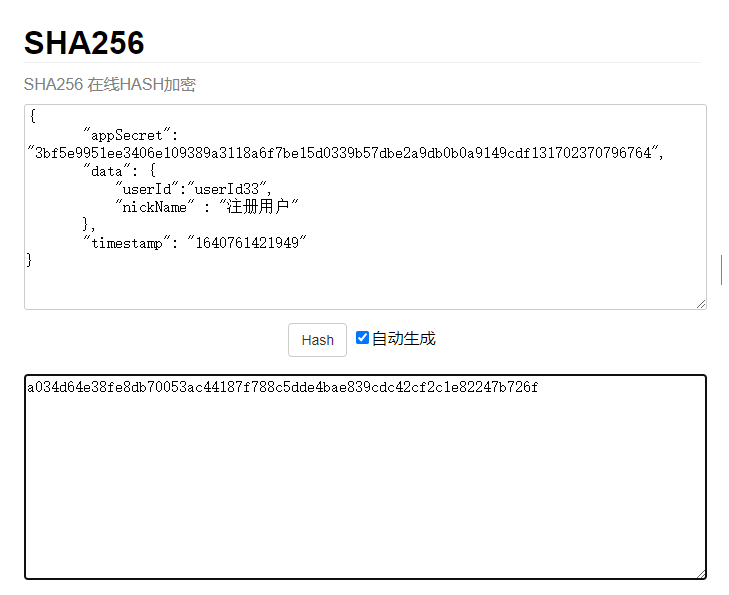
在线加密地址:https://crypot.51strive.com/sha256.html
java代码示例
/**
 * 注册用户接口
 * @param args
 */
public static void main(String[] args) {
        // +++++++++++++++++++++++++++++++++ 组装post请求数据 +++++++++++++++++++++++++++++++++
        // 获取时间戳
        Long timestamp = System.currentTimeMillis();

        // 设置时间戳和密钥
        TreeMap<String,Object> param = new TreeMap<>();
        param.put("timestamp",timestamp.toString());
        param.put("appSecret", "3bf5e9951ee3406e109389a3118a6f7be15d0339b57dbe2a9db0b0a9149cdf131702370796764");
        // 实际的接口数据
        TreeMap<String,Object> dataMap = new TreeMap<>();
        dataMap.put("userId", "userId33");
        dataMap.put("nickName","注册用户");
        param.put("data", dataMap);

        // 签名
        Digester sha256 = new Digester(DigestAlgorithm.SHA256);
        String sysSign = sha256.digestHex(Json.toJsonString(param));
        // 添加签名和账号id
        param.put("sign" , sysSign);
        param.put("appId","167633802736");
        String result = HttpRequest.post("http://localhost:8086/p/server/user/register")
        .header("grantType","sign")
        .header("Content-Type","application/json")
        .body(JSONObject.toJSONString(param))
        .execute().body();

        // +++++++++++++++++++++++++++++++++ 响应数据验签 +++++++++++++++++++++++++++++++++

        // 结果验签
        TreeMap<String, Object> responseMap = JSONObject.parseObject(result, TreeMap.class);

        TreeMap<String, Object> map = new TreeMap<>();
        map.put("appSecret", "3bf5e9951ee3406e109389a3118a6f7be15d0339b57dbe2a9db0b0a9149cdf131702370796764");
        map.put("data", responseMap.get("data"));
        map.put("timestamp", responseMap.get("timestamp"));

        // 验签
        if (Objects.equals(responseMap.get("sign").toString(), sha256.digestHex(Json.toJsonString(map)))) {
        System.out.println("success");
        }

        }
将用户token以及过期时间同步到商城接口
data参数构成
| 字段元素 | 类型 | 必填条件 | 说明 |
|---|---|---|---|
| userId | String | 必填 | 通信的用户唯一ID,可以随机uuid (建议自己服务端的用户唯一uid) |
| accessToken | String | 必填 | 校验的token,随机uuid(建议使用自己服务端的用户的token) |
| expiresIn | Long | 必填 | token在多少秒后过期 |
| openId | String | 否 | |
| socialType | String | 否 |
调用演示
接口地址:/p/server/user/token
请求类型:post
接口请求参数
{
 "userId":"userId33",
 "accessToken" : "token_test",
 "expiresIn": "10000"
 "openId": "xxxxxx",
 "socialType": "1"
}
实际的请求格式为:
curl --location --request POST 'http://localhost:8086/p/server/user/token' \
--header 'grantType: sign' \
--header 'Content-Type: application/json' \
--data-raw '{
    "appId":"appId123456",
    "timestamp":1640761421949,
    "data":{
"userId":"userId33",
"accessToken" : "token_test",
"expiresIn": "10000"
"openId": "xxxxxx",
"socialType": "1"
},
    "sign":"bdb4bf1c63dada19901d7022e187d1558b1ce001c3ae53bb9b6ac37355a9bcbe"
}'
appId:分配给应用的系统密钥id
timestamp: 请求的时间戳,根据当前时间生成
sign: 签名,使用该请求参数生成,生成流程在下面有说明
data参数为接口的参数
sign(签名)的生成流程(与注册用户接口一样)
java代码示例
 /**
     * 将用户token以及过期时间同步到商城
     * @param args
     */
    public static void main(String[] args) {
        // +++++++++++++++++++++++++++++++++ 组装post请求数据 +++++++++++++++++++++++++++++++++
        // 获取时间戳
        Long timestamp = System.currentTimeMillis();

        // 设置时间戳和密钥
        TreeMap<String,Object> param = new TreeMap<>();
        param.put("timestamp",timestamp.toString());
        param.put("appSecret", "3bf5e9951ee3406e109389a3118a6f7be15d0339b57dbe2a9db0b0a9149cdf131702370796764");
        // 实际的接口数据
        TreeMap<String,Object> dataMap = new TreeMap<>();
        dataMap.put("userId", "userId33");
        dataMap.put("accessToken","token_test");
        dataMap.put("expiresIn",1000L);
        dataMap.put("openId","xxxxxxx");
        dataMap.put("socialType","1");
        param.put("data", dataMap);

        // 签名
        Digester sha256 = new Digester(DigestAlgorithm.SHA256);
        String sysSign = sha256.digestHex(Json.toJsonString(param));
        // 添加签名和账号id
        param.put("sign" , sysSign);
        param.put("appId","167633802736");
        String result = HttpRequest.post("http://localhost:8086/p/server/user/token")
                .header("grantType","sign")
                .header("Content-Type","application/json")
                .body(JSONObject.toJSONString(param))
                .execute().body();

        // +++++++++++++++++++++++++++++++++ 响应数据验签 +++++++++++++++++++++++++++++++++

        // 结果验签
        TreeMap<String, Object> responseMap = JSONObject.parseObject(result, TreeMap.class);

        TreeMap<String, Object> map = new TreeMap<>();
        map.put("appSecret", "3bf5e9951ee3406e109389a3118a6f7be15d0339b57dbe2a9db0b0a9149cdf131702370796764");
        map.put("data", responseMap.get("data"));
        map.put("timestamp", responseMap.get("timestamp"));

        // 验签
        if (Objects.equals(responseMap.get("sign").toString(), sha256.digestHex(Json.toJsonString(map)))) {
            System.out.println("success");
        }
    }
修改用户接口(用于修改用户昵称)
data参数构成
| 字段元素 | 类型 | 必填条件 | 说明 |
|---|---|---|---|
| userId | String | 必填 | 通信的用户唯一ID,可以随机uuid (建议自己服务端的用户唯一uid) |
| nickName | String | 必填 | 用户昵称,商城有些通知会需要用到 |
调用演示
接口地址:/p/server/user/update
请求类型:put
接口请求参数
{
 "userId":"123",
 "nickName": "修改名称"
}
实际的请求格式为:
curl --location --request PUT 'http://localhost:8086/p/server/user/token' \
--header 'grantType: sign' \
--header 'Content-Type: application/json' \
--data-raw '{
    "appId":"167633802736",
    "timestamp":1640761421949,
    "data":{
"userId":"123",
"nickName": "修改名称"
},
    "sign":"bdb4bf1c63dada19901d7022e187d1558b1ce001c3ae53bb9b6ac37355a9bcbe"
}'
appId:分配给应用的系统密钥id
timestamp: 请求的时间戳,根据当前时间生成
sign: 签名,使用该请求参数生成,生成流程在下面有说明
data参数为接口的参数
sign(签名)的生成流程(与注册用户接口一样)
java代码示例
/**
     * 更新用户接口
     * @param args
     */
    public static void main(String[] args) {
        // +++++++++++++++++++++++++++++++++ 组装put请求数据 +++++++++++++++++++++++++++++++++
        // 获取时间戳
        Long timestamp = System.currentTimeMillis();

        // 设置时间戳和密钥
        TreeMap<String,Object> param = new TreeMap<>();
        param.put("timestamp",timestamp.toString());
        param.put("appSecret", "3bf5e9951ee3406e109389a3118a6f7be15d0339b57dbe2a9db0b0a9149cdf131702370796764");
        // 实际的接口数据
        TreeMap<String,Object> dataMap = new TreeMap<>();
        dataMap.put("userId", "userId33");
        dataMap.put("nickName","修改名称");
        param.put("data", dataMap);

        // 签名
        Digester sha256 = new Digester(DigestAlgorithm.SHA256);
        String sysSign = sha256.digestHex(Json.toJsonString(param));
        // 添加签名和账号id
        param.put("sign" , sysSign);
        param.put("appId","167633802736");
        String result = HttpRequest.put("http://localhost:8086/p/server/user/update")
                .header("grantType","sign")
                .header("Content-Type","application/json")
                .body(JSONObject.toJSONString(param))
                .execute().body();

        // +++++++++++++++++++++++++++++++++ 响应数据验签 +++++++++++++++++++++++++++++++++

        // 结果验签
        TreeMap<String, Object> responseMap = JSONObject.parseObject(result, TreeMap.class);

        TreeMap<String, Object> map = new TreeMap<>();
        map.put("appSecret", "3bf5e9951ee3406e109389a3118a6f7be15d0339b57dbe2a9db0b0a9149cdf131702370796764");
        map.put("data", responseMap.get("data"));
        map.put("timestamp", responseMap.get("timestamp"));

        // 验签
        if (Objects.equals(responseMap.get("sign").toString(), sha256.digestHex(Json.toJsonString(map)))) {
            System.out.println("success");
        }
    }
禁用用户接口
data参数构成
| 字段元素 | 类型 | 必填条件 | 说明 |
|---|---|---|---|
| userId | String | 必填 | 通信的用户唯一ID,可以随机uuid (建议自己服务端的用户唯一uid) |
调用演示
接口地址:/p/server/user/disable
请求类型:put
接口请求参数
{
 "userId":"123",
}
实际的请求格式为:
curl --location --request PUT 'http://localhost:8086/p/server/user/token' \
--header 'grantType: sign' \
--header 'Content-Type: application/json' \
--data-raw '{
    "appId":"167633802736",
    "timestamp":1640761421949,
    "data":{
"userId":"123"
},
    "sign":"bdb4bf1c63dada19901d7022e187d1558b1ce001c3ae53bb9b6ac37355a9bcbe"
}'
appId:分配给应用的系统密钥id
timestamp: 请求的时间戳,根据当前时间生成
sign: 签名,使用该请求参数生成,生成流程在下面有说明
data参数为接口的参数
sign(签名)的生成流程(与注册用户接口一样)
java代码示例
/**
     * 禁用用户接口
     * @param args
     */
    public static void main(String[] args) {
        // +++++++++++++++++++++++++++++++++ 组装put请求数据 +++++++++++++++++++++++++++++++++
        // 获取时间戳
        Long timestamp = System.currentTimeMillis();

        // 设置时间戳和密钥
        TreeMap<String,Object> param = new TreeMap<>();
        param.put("timestamp",timestamp.toString());
        param.put("appSecret", "3bf5e9951ee3406e109389a3118a6f7be15d0339b57dbe2a9db0b0a9149cdf131702370796764");
        // 实际的接口数据
        TreeMap<String,Object> dataMap = new TreeMap<>();
        dataMap.put("userId", "userId33");
        param.put("data", dataMap);

        // 签名
        Digester sha256 = new Digester(DigestAlgorithm.SHA256);
        String sysSign = sha256.digestHex(Json.toJsonString(param));
        // 添加签名和账号id
        param.put("sign" , sysSign);
        param.put("appId","167633802736");
        String result = HttpRequest.put("http://localhost:8086/p/server/user/disable")
                .header("grantType","sign")
                .header("Content-Type","application/json")
                .body(JSONObject.toJSONString(param))
                .execute().body();

        // +++++++++++++++++++++++++++++++++ 响应数据验签 +++++++++++++++++++++++++++++++++

        // 结果验签
        TreeMap<String, Object> responseMap = JSONObject.parseObject(result, TreeMap.class);

        TreeMap<String, Object> map = new TreeMap<>();
        map.put("appSecret", "3bf5e9951ee3406e109389a3118a6f7be15d0339b57dbe2a9db0b0a9149cdf131702370796764");
        map.put("data", responseMap.get("data"));
        map.put("timestamp", responseMap.get("timestamp"));

        // 验签
        if (Objects.equals(responseMap.get("sign").toString(), sha256.digestHex(Json.toJsonString(map)))) {System.out.println("success");
        }
    }
调用用户端其他接口演示
前提:已经注册用户(调用注册用户接口)、并且将token同步到系统中(调用将用户token以及过期时间同步到商城接口)
下面我将通过一个获取用户详情接口(无请求参数)演示
请求头token: 拿上面已经同步到系统的接口token_test
接口请求参数: 具体参数查看接口文档,封装好参数即可

java代码示例
/**
     * 获取用户详情接口
     * @param args
     */
    public static void main(String[] args) {
        // 请求接口
        String result = HttpRequest.get("http://localhost:8086/p/user/userInfo")
                .header("Content-Type","application/json")
                // 设置请求头,传已经同步到系统的token
                .header("Authorization", "token_test")
                .execute().body();

        // +++++++++++++++++++++++++++++++++ 获取响应数据+++++++++++++++++++++++++++++++++

        // 响应数据
        TreeMap<String, Object> responseMap = JSONObject.parseObject(result, TreeMap.class);
        System.out.println(responseMap.get("data"));
    }
输出结果
